Windows software for law offices from ERICH Incorporated

Real estate closing software

Closing Disclosure & TRID Software for Attorneys and Law Offices — Free Trial

Prepare CFPB Closing Disclosures in a focused Windows program for attorneys and closing professionals. Use calculations, validation, saved closing files, continuation pages and print/PDF output. Download the free trial before purchasing the $199 license.

$199one-time purchase • no required monthly subscription

Download first. Purchase only if the current Windows workflow fits your office.

$199 one-time purchaseSecure PayPal checkoutWindows desktop softwarePhone & email support

Search intent: Closing Disclosure & TRID software

A dedicated workflow instead of a blank form

For offices comparing Closing Disclosure software or TRID software, the trial shows the calculations, validation, saved-closing workflow and print/PDF output before you commit.

$199 One-TimeStraightforward purchase
Closing WorkflowCalculations and validation
Local FilesData stays on your computer
Direct SupportPhone and email help

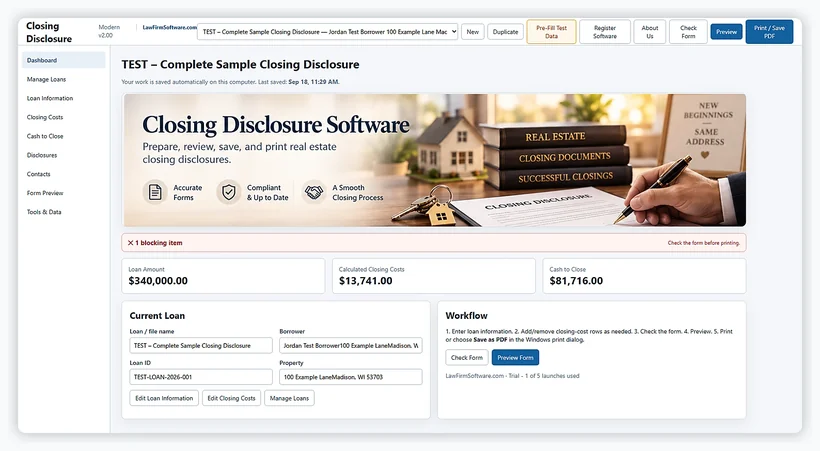
Actual software screens

Actual Closing Disclosure Software Screens

Show visitors the real workflow before they download the trial: welcome, loan information, closing costs and print/review output.

Welcome dashboardStart from a focused desktop dashboard and move directly into the Closing Disclosure workflow.
Loan information screenEnter loan and transaction information in a structured workspace built for repeatable closing files.
Closing cost detailsOrganize detailed closing costs in one screen instead of piecing together a one-off form workflow.
Print and review outputReview the finished disclosure in print preview before printing or producing PDF-oriented output.

Click any screenshot to enlarge it, then use the arrows to review the rest of the workflow.

Closing Disclosure Software welcome dashboard

Actual software screen

Keep the Closing Workflow in One Focused Desktop Program

The desktop workflow keeps closing data, calculations, validation, saved files, review and print output centered on the transaction you are preparing.

  • Closing Disclosure data entry
  • Automatic calculations for key totals
  • Validation summary
  • Save and reopen closing files
  • Review & Print workflow
  • Continuation-page handling

Purchase confidence

Exactly What the $199 Purchase Includes

Price$199 one-time purchase
PlatformMicrosoft Windows desktop software
Data modelLocal working files; no LawFirmSoftware.com cloud account required
OutputReview, print and PDF-ready workflow with continuation pages
RegistrationUser ID + verified PayPal transaction/order ID
SupportPhone and email support from ERICH Incorporated
Trial access: The current build supports up to 5 trial launches before registration. Download the trial now and test the workflow before purchasing.

Free Windows trial

Try Closing Disclosure Software Before You Buy

Download the Windows trial and test the data-entry, calculation, validation, saved-file and print workflow. The current build supports up to 5 trial launches before registration.

Free Windows trialUp to 5 trial launchesNo required monthly subscription
Download Free TrialBuy Now — $199Try the current Windows release first. Purchase only when you are ready.

Simple purchase & registration

From PayPal Checkout to Registered Software

Purchase

Buy through the secure PayPal checkout for $199.

Open Software

Locate the User ID shown in the registration screen.

Verify

Use the payment-confirmation page with your PayPal transaction/order ID.

Activate

After verification, the site generates the matching passcode.

Frequently asked questions

Closing Disclosure Software FAQs

Can I try the Closing Disclosure software before buying?

Yes. The current build supports up to 5 trial launches before registration, so you can test the Windows workflow before purchasing.

What does the Closing Disclosure software help prepare?

The desktop workflow centers on Closing Disclosure data entry, calculations, validation, saved closing files, review and print/PDF output.

Does the software handle continuation pages?

Yes. The current workflow includes continuation-page handling for overflow information.

Can I save and reopen closing files?

Yes. Closing files are designed to be saved locally on the Windows computer and reopened for later review or revision.

Can I print the Closing Disclosure or create PDF output?

The workflow includes review and print output, with PDF-oriented output and continuation-page handling.

Is this Closing Disclosure software a subscription?

No. The current price is $199 as a one-time purchase with no required monthly subscription.

How do I register after purchase?

Use the User ID displayed by the software and your PayPal transaction or order ID on the payment-confirmation page to obtain the matching passcode.

Where can I find free TRID timing and Closing Disclosure tools?

Use the Closing Disclosure Resource Center for the 3-business-day calculator, corrected-disclosure guidance, timeline and checklist.

Free form vs. preparation workflow

The Closing Disclosure Form Is Free. The Software Organizes the Work Around It.

CFPB publishes the disclosure form and guidance. The $199 Windows program is for offices that need calculations, validation, saved closing files, continuation pages, and repeatable print/PDF output instead of a one-off form review.

Free tools are enough whenYou only need to check timing, review a correction trigger, or use a closing checklist.
Use the software whenYou prepare Closing Disclosures repeatedly and want calculations, validation, saved transactions and output in one local workflow.
One-time price$199 for the current Windows version, with no required monthly subscription.

Download the Closing Disclosure Software Free Trial

Try the current Windows build before buying. Test the closing workflow first, then purchase the $199 one-time license if it fits your office.

Before you purchase

Know what you are getting

The trial lets you inspect the actual program. Check the points below before purchasing a license for professional work.

Windows desktop program

Download and install it on your computer, then open the free trial to review the interface.

One-time price, shown upfront

$199 one-time purchase. No required monthly subscription is advertised for this product.

PayPal checkout & registration

Use the Buy Now link, retain your PayPal receipt, and follow the product-specific registration instructions after payment.

Need compatibility details?

Ask us about the form revision, supported features, operating system compatibility, licensing, and updates before ordering.

Questions before buying?

Ask about Closing Disclosure Software

Need to confirm forms, file output, licensing, supported versions, or Windows compatibility? Send a question to our sales/support team.

(608) 444-6575  ·  info@lawfirmsoftware.com

Do not include client names, tax identification numbers or confidential case information in this form.

We use these details only to respond to your request.

Call SalesAll SoftwareFree Tools